Makeup Stylist: Makeup Game
- 4.4
- Rating
- 50.00M
- Installs
- Free
- Price
 Analysis by App-foxy
I spent time with Makeup Stylist: Makeup Game as a casual beauty simulation, and my first impression was clear: it is built for quick, visual play rather than serious makeup education. The basic appeal is easy to understand. You work through beauty makeovers, choose cosmetic looks, and shape a salon-style result without needing to know anything about real products or techniques. For a short break, that simplicity works well.
The game comes from HDuo Fun Games and is free to start, with optional purchases ranging from $2.99 to $29.99 per item. It is rated for Everyone, runs on devices using Android 6.0 or later, and its current version is 3.551. Those details make it approachable for families and casual players, although the purchase range is worth remembering if a child will play on a shared device.
What the makeover workflow feels like in everyday use
The most natural way to play is in short sessions. I would open it when I had a few minutes, complete a makeover sequence, and stop without feeling that I had left a complicated task unfinished. That makes it a better fit for waiting rooms, commutes, or a quick wind-down than for someone seeking a deep simulation with a long-term character or salon-management system.
You May Also Like

 Pandora - Music & Podcasts
Pandora’s Music Is Easy to Start, but Harder to Recover
Pandora’s strength is its low-effort path from a seed to a station. Its weak spot is how much confidence it asks you to place in connection, setup, and quiet recovery.

 8 Ball Pool
 Is Built on Rivalries, Rematches, and Routine
A close look at the rivalries, rematches, shared routines, and unanswered safety questions that turn a quick pool match into a persistent mobile community.

 Samsung Music
’s Quiet Strength Is Playing What You Already Own
Its reach comes less from spectacle than from dependable access to a personal library. That simplicity is both the app’s strongest retention engine and its ceiling.

 AccuWeather: Weather Radar
AccuWeather Review: A Quick, Clear Forecast for Everyday Decisions
For everyday plans, the best forecast is the one you can understand quickly. AccuWeather makes rain timing, radar, and local conditions easy to act on, with a few trade-offs.

 Hill Climb Racing
Why Hill Climb Racing Still Turns Crashes Into One More Run
A tiny car, a bumpy hill and one more upgrade: Hill Climb Racing keeps resurfacing because its simple chaos makes every near-miss feel personal.

 AliExpress - Shopping App
AliExpress Makes Global Shopping Feel Personal, but Shoppers Bear the Risk
AliExpress turns a global marketplace into a pocket-sized discovery engine. Its reach is useful, its shopping loop compelling, and its trade-offs easy to miss.
More From Our News Desk
View All News


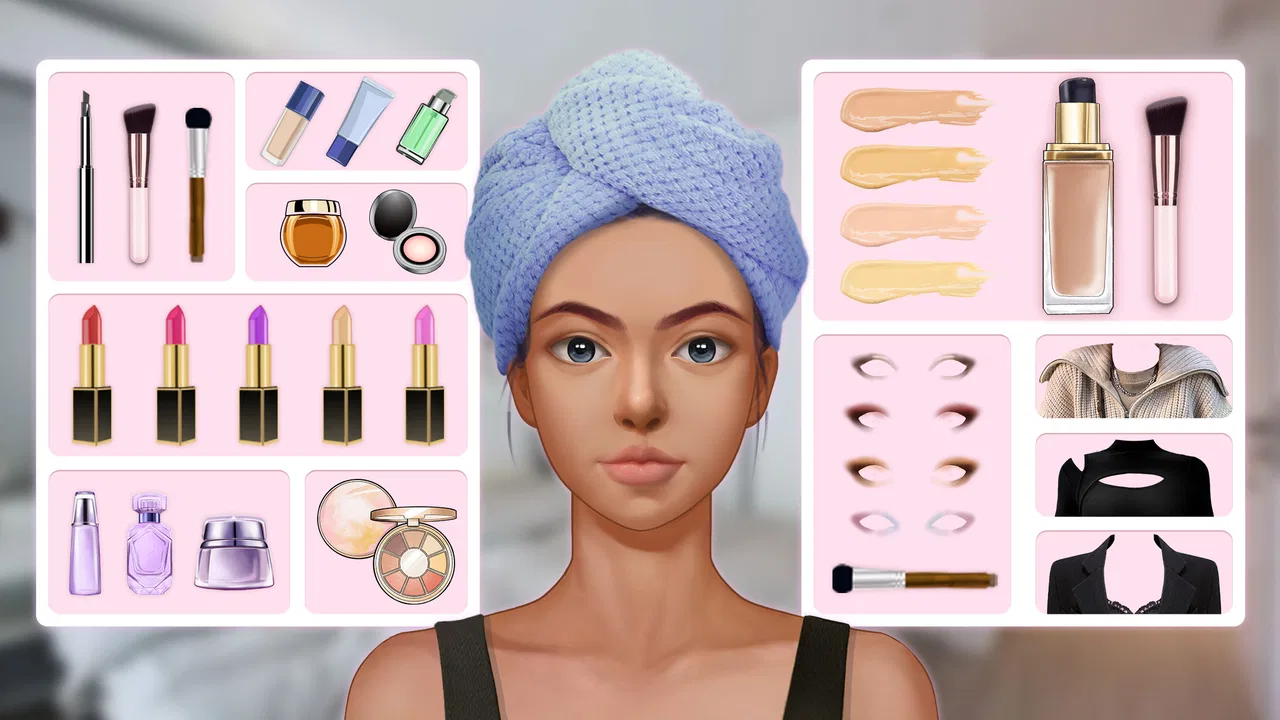
The central pleasure comes from seeing a face change step by step. Makeup games depend heavily on visual feedback, and this one is at its best when each choice produces an obvious difference. I found it more satisfying to compare the overall balance of a look than to treat every selection as a correct-or-incorrect answer. That mindset matters because the game is more about styling and presentation than learning professional application.
New players may get stuck not because the concept is difficult, but because they expect every screen to behave like a conventional menu. In a makeover game, the useful action is often the visible item or control on the current screen, while decorative elements are easy to mistake for interactive ones. My practical advice is to pause after each transition and identify what has changed before tapping repeatedly. Fast tapping can make it harder to tell whether a selection registered or whether the game has simply moved to another stage.
Another common point of friction is the difference between finishing a look and understanding what the game expects next. If the screen appears to stop responding, I would first look for a confirmation, continuation, or completion control before assuming the app has failed. This is especially important on smaller phones, where buttons and visual prompts can feel crowded. Rotating the device is not something I would recommend casually, since changing orientation during a sequence can make the layout feel less predictable.
The game’s broad audience is one of its strengths. Its Everyone rating and straightforward presentation make it suitable for players who want harmless creative play without combat, complicated rules, or a demanding tutorial. I can also see it working well for a parent and child taking turns choosing a style. The adult can discuss color balance and the child can focus on the visual transformation, without either person needing specialist knowledge.
At the same time, the simplicity limits its appeal for older players who want a detailed beauty simulator. If you are looking for realistic product names, professional skin preparation, lighting controls, or a precise lesson about technique, this is probably not the right category of game. A dress-up title may offer broader outfit coordination, while a dedicated beauty tutorial app would be more useful for real-world learning. This game is best understood as playful styling, not a replacement for either.
Before blaming the game, check the basic setup
Because the game is free to install and has attracted over 50 million installs, it is easy to assume that any problem must be unusual. In practice, ordinary setup issues can affect a casual game just as much as a large one. I would begin by checking that the device meets the minimum Android requirement of 6.0 and that the installation has completed fully. A device that is technically supported can still struggle if storage is nearly full or if several demanding apps are open at once.
I would also close other games and video-heavy apps before starting a makeover session. This is not a special requirement of the title; it is a sensible way to reduce background pressure on an older phone. If the game opens but transitions feel delayed, give each screen a moment instead of tapping repeatedly. Repeated taps can create confusion because you may activate the next available action just as the display catches up.
For anyone managing a child’s device, I would check purchase controls before handing it over. The game is free, but optional items can cost up to $29.99, so the important preparation is not only technical. Make sure the device’s purchase authentication is configured in the way you expect, and explain that free installation does not necessarily mean every item inside the game is free. This is a small step that prevents a much bigger surprise.
The rating of 4.4 from around 250 thousand ratings suggests that many players find the basic experience enjoyable, but a rating should not be treated as a guarantee that it will suit every phone or every taste. I would use it as a sign that the core concept has broad appeal, then judge it against your own expectations. Someone who wants a gentle visual game may be happy quickly; someone who dislikes optional purchase prompts may become frustrated even if the makeover mechanics themselves are enjoyable.
Version 3.551 is another useful detail when checking an installation. If a friend describes a screen that looks different from yours, compare the installed version before assuming that one of you is doing something wrong. On mobile games, small interface changes can alter where a control appears or how a sequence progresses. I would avoid relying on old screenshots or instructions made for an earlier release when troubleshooting a current installation.
Connection quality can also affect the experience, particularly around loading or any part of the game that depends on content being retrieved. If a screen remains incomplete, I would try a stable connection, wait briefly, and then restart the game normally. I would not repeatedly reinstall as a first response. Reinstallation is disruptive and may not solve a temporary network or device issue.
How I recover when a makeover session goes wrong
My recovery routine is deliberately simple. First, I stop tapping and observe the screen. Second, I check whether the current stage has a visible action still waiting for input. Third, I close the game and reopen it if the screen remains unchanged. This sequence is more useful than pressing every control at once because it separates a missed instruction from a genuine freeze.
If the game closes unexpectedly, I would reopen it once and test a short sequence before changing anything else. If it continues to close, I would restart the phone, confirm that enough storage is available, and make sure the operating system is supported. These are general, low-risk checks that address the most common causes of unstable casual play without inventing a special fix for this particular game.
When a choice seems not to apply, I would look for visual confirmation rather than immediately repeating the selection. Some players naturally tap harder or faster when a screen does not react, but that can make the next step difficult to follow. A slower rhythm is surprisingly useful in makeover games: choose one item, watch the face update, then continue. It also makes it easier to judge whether the change actually improves the look.
A helpful workflow is to decide on a general style before making individual selections. For example, I might aim for a soft, coordinated look rather than choosing each item in isolation. This prevents the session from becoming a random sequence of taps and gives the final result more meaning. It is a small strategy, but it turns the game from a checklist into a creative exercise.
I also recommend treating the final appearance as the goal, not the speed of completion. Rushing may be fine when replaying a familiar sequence, but during a first attempt it hides the game’s strongest quality: the gradual visual change. If a child is playing, asking them to explain why they prefer one result can make the session more engaging than simply trying to finish as quickly as possible.
Players should be careful with purchases when recovering from a blocked or confusing screen. If an item appears unavailable, do not assume that buying it is the only way forward. First confirm that the current stage is complete and that the game has registered the previous action. A purchase should be an intentional choice about optional content, not a troubleshooting shortcut.
When the problem is probably outside the app
Not every poor experience points to a defect in the game. A phone with aggressive battery-saving settings may pause background activity or make transitions feel uneven. A crowded storage drive can affect many apps at once. A weak connection can make loading look like a frozen screen. If several unrelated apps are also slow, I would investigate the device rather than focusing only on Makeup Stylist.
Touchscreen problems are another possibility. If taps fail in the same area across different apps, the issue may be the display, a thick screen protector, or a case that interferes with edge controls. Testing another app is a quick way to separate a game-specific problem from a hardware or system problem. This check is especially useful when a button appears visible but does not respond consistently.
Notifications and interruptions can make a short makeover session feel broken even when the game is working normally. Incoming calls, low-battery warnings, or switching rapidly between apps can interrupt the flow. I prefer starting a session with the phone charged and unnecessary interruptions reduced. That is not essential for everyone, but it makes the visual sequence easier to follow.
Expectations are often the real source of disappointment. The store summary presents a beauty makeover experience, and that is what I would approach it for. I would not install it expecting a realistic salon business, a competitive challenge, or a structured course. Compared with fashion dress-up games, its focus is narrower; compared with professional beauty tools, it is much more playful. That narrower purpose is not a flaw, but it does mean the right audience matters.
The developer, HDuo Fun Games, has positioned the title as an accessible simulation rather than a demanding technical experience. That makes it easy to recommend to casual players, but it also means experienced simulation fans may find the decision-making light. If you want resource management, detailed customization, or a story that develops over many sessions, another simulation game will probably give you more to work toward.
Who should install it and who should skip it
I would recommend this game to players who enjoy visual transformations, simple beauty themes, and short sessions. It is particularly suitable for someone who wants an approachable activity with no steep learning curve. The Everyone rating also makes it a reasonable option for family-friendly play, provided an adult handles purchase settings on shared devices.
It can also work as a creative prompt. Instead of asking whether a look is objectively good, I would use each makeover to think about matching colors, keeping a style consistent, and noticing how a small change affects the whole face. That gives the game a little more depth without pretending it is a real makeup lesson.
I would skip it if optional purchases are a deal-breaker, if you prefer games with a strong narrative, or if you need accurate guidance for applying makeup in real life. I would also look elsewhere if you want a demanding simulation with long-term progression. Its popularity, reflected in a 4.4 average and roughly 250 thousand ratings, does not change that basic trade-off: broad accessibility comes with a lighter level of complexity.
For a realistic everyday scenario, imagine waiting for an appointment with only a few minutes available. This is the kind of situation where the game makes sense: open it, create a look, enjoy the visual result, and put it away. If you instead have a long evening and want a game that rewards planning across several connected systems, I would choose a deeper simulation. Knowing that difference before installing saves time and avoids unfair criticism.
My practical verdict after using it
Makeup Stylist: Makeup Game is a pleasant, uncomplicated beauty simulation for quick creative play. I like that the central idea is immediately understandable and that the visual makeover gives each session a clear sense of completion. The free entry point and Everyone rating make it easy to try, while support for Android 6.0 or later keeps the technical barrier relatively broad.
Its limitations are just as clear. The experience is not aimed at professional instruction, deep salon management, or players who need complex progression. Optional purchases also deserve attention, especially on a child’s device. Setup and recovery are generally best handled with patient, ordinary checks: confirm compatibility, allow screens to finish loading, avoid frantic tapping, and test the phone itself if other apps show similar trouble.
With those expectations in place, I think it is worth trying for fans of makeover games who want a relaxed visual activity rather than a demanding simulation. My strongest advice is to judge each look as a complete design, keep purchases deliberate, and treat any slowdown as a setup question before assuming the game is at fault. Its best quality is the low-pressure creativity, not technical depth, and that is exactly why it works for short, casual sessions.
FAQs for Makeup Stylist: Makeup Game
01What is the primary objective of Makeup Stylist: Makeup Game?
Makeup Stylist: Makeup Game is designed to let players express their creativity by applying makeup to virtual models. The primary objective is to complete various makeup challenges, enhance models’ looks, and unlock new tools and cosmetics as you advance. It’s a fun and interactive way to explore different makeup styles and techniques.
02Is Makeup Stylist: Makeup Game suitable for all ages?
Yes, Makeup Stylist: Makeup Game is suitable for players of all ages. Its user-friendly interface and easy-to-follow tutorials make it accessible for younger audiences, while the more advanced features and challenges keep it engaging for older players. Parental guidance is recommended for younger children to ensure a safe and enjoyable experience.
03Does the app include in-app purchases, and are they necessary?
Makeup Stylist: Makeup Game does offer in-app purchases to enhance gameplay, such as unlocking premium cosmetics and tools. While these purchases can enrich the experience, they are not necessary to enjoy the game. Players can progress and complete challenges without spending money, although free content might have limitations.
04What kind of devices is Makeup Stylist: Makeup Game compatible with?
Makeup Stylist: Makeup Game is compatible with both Android and iOS devices. It is optimized to work smoothly on a wide range of smartphones and tablets. To ensure the best experience, it’s recommended to check the app store for specific system requirements and ensure your device is up to date with the latest software.
05Are there any social features in Makeup Stylist: Makeup Game?
Yes, the game includes social features that allow players to share their creations with friends and the community. Players can connect with social media accounts to showcase their makeup designs and participate in challenges. This feature enhances the interactive experience and fosters a sense of community among users.
Pros
- Wide variety of makeup tools.
- Realistic makeup effects.
- Easy to navigate interface.
- Regular updates with new styles.
- No intrusive ads during gameplay.
Cons
- Limited free options.
- Requires internet connection.
- Occasional app crashes.
- In-app purchases can be pricey.
- Some styles locked behind paywall.

Makeup Stylist: Makeup Game
Gallery